
 Students/Staff
 Parents
The Habit Behind Every Build
Seven technologies = one habit
Syntax changes every Seven years. The habit doesn't.
We teach
computational thinking
first, then Seven technologies to practice it in.
Decompose. Pattern. Abstract. Iterate. Every module (Scratch, JavaScript, Python, Web, AI, Web development, 3D design) is the same four moves in a new dialect. By Grade 8, these moves become second nature.
Block-based to AI in, one continuous arc. The languages are the vehicle. The thinking is the cargo.
Late Starts · Same Builder
Worried your child is behind? Your child still ships a portfolio.
Worried your child is behind? Your child still ships a portfolio.
The progression compounds best when it starts in Grade 3, but the modular curriculum places by ability, not age. Whichever grade your child enters at, they unlock the next module by shipping the last one.
Python shipping by Grade 7.
Full-stack capstone by Grade 8.
What Your Child Will Ship
A portfolio of real, running projects.
A portfolio of
real, running projects.
Every module ends in a real, working build your child owns. We don't publish the catalogue, every cohort ships something different. But the themes are constant: Different lenses your child gets to point code at.
Theme 01 · Space

Space & the planets.
Gravity simulations, planetary calculations, sunrises and sunsets, live NASA-feed data.
Theme 02 · Natural world

The natural world.
Live weather, air quality, wildlife data, sustainable-energy modelling.
Theme 03 · Social good

People & social good.
Anti-bullying tools, emergency one-tap apps, voting systems, symptom-aware health bots.
Theme 04 · Games

Games & play.
Classic arcade rebuilds, physics-driven platformers, word puzzles, board games.
Theme 05 · Creativity

Stories & creativity.
Animated stories, digital music, art generators, greeting cards.
Theme 06 · Everyday life
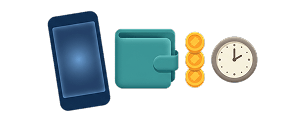
Everyday life & money.
Schedules, timers, expense trackers, currency converters, ticket-booking flows.
Every capstone is owned by the student, the build, the code, the link. We don't host their work behind a paywall.
One cycle · Three bands
A cycle is a calendar that wraps.
Each grade band runs as one continuous cycle. Your child joins at whichever module the class is on today, and circles back to the start of the program.
Grades 3 to 4
Build the
builder.
One full cycle
builder.
Scratch
Web Dev
App Dev
Python
3D Design
Grades 5 to 6
Real syntax.
Real builds.
One full cycle
Real builds.
JavaScript
Python
Web Dev
AI
Grades 7 to 8
Capstone
portfolio.
One full cycle
portfolio.
JavaScript
Python
Web Dev
AI
typical entry · most kids start here
any module is a valid start
1 teacher : 4 students · monthly show-and-tell
Post-AI Skills
The 4 skills AI won't replace. Built in every coding class.
Not as a separate lesson, but inside the work, 1 teacher per 4 kids, every kid explains, every class ships something real. That structure is what builds the four skills below.
Communicate with clarity
viaThe Protégé Effect
Think critically
viaComputational thinking
Lead under pressure
viaThe 1:4 class format
Build things that work
viaEvery shipped capstone
Mastery = Shipped
Your child earns each module by shipping it.
Capstone project per module · Reviewed and demoed live · Promotion issued on a working build, not on attendance.
A capstone is a real, running project (a game, a site, a tool, a model) built across the module, then shipped at the end of it.
1capstone*
The Gate
Ship the capstone. The next module unlocks. Not before.
Monthly Show-and-Tell
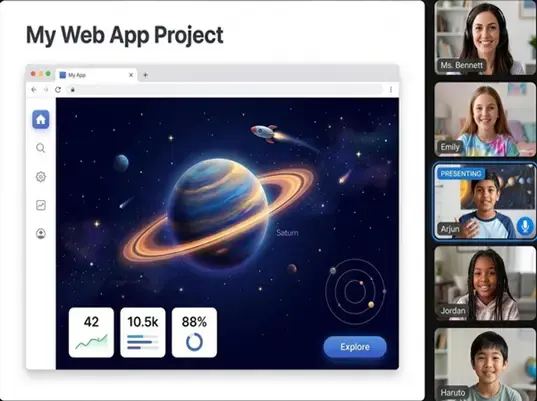
Twice a month, your child stands up and demos what they built.
Cohort + parents + instructors on the call. Your child opens their build, walks through the decisions, takes the questions. It's the moment "I made this" becomes a sentence they say out loud.
Show & Tell · Live
How Engineers Actually Work
No engineer ships alone. Your child shouldn't learn alone either.
Real software is built in teams: code review, pair programming, standup, demo day. A 1:1 class trains the wrong muscle. A 1:4 class trains the one that ships.
"In every 98thPercentile coding class, the kid who explains the function to a peer is the one who masters it. Watch a class for ten minutes, you'll see the Protégé Effect work in real time. That's why we don't do 1:1."
98thPercentile Curriculum Lead
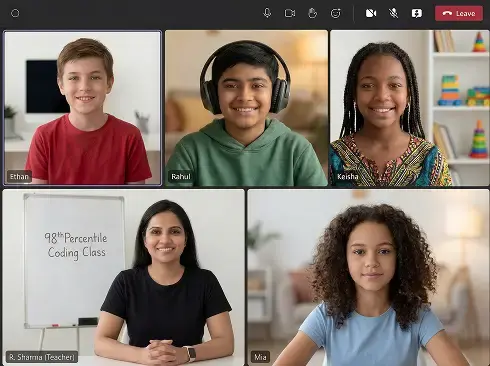
1:4 ratio
50-min live · 2 Classes per week
One trial class. Same 1:4 room your child would keep. First capstone shipped within Module 1.
The Academy Owns the Progress
Zero parental instruction required. Ever.
A dedicated Student Success Manager · Need-based 1:1 catch-up classes at no extra fee · Every class recorded.
Step 01 · Done
Register
Two-minute form. Student portal created. Trial class scheduled.
Step 02 · Assigned
Success Manager
One named person meets you at registration. Same person through the entire program.
Step 03 · Next
Class One
Scorecard lands. Two weeks of live classes unlock. 50 minutes, 1:4, live.
What Our Coding Students Win
When 98thPercentile coding students enter the IKCC, they land on the leaderboard.
When 98thPercentile coding students enter the IKCC, they
land on the leaderboard.
International Kids Coding Competition · 2023 + 2024 cohorts. Verifiable, ranked, peer-reviewed, the same leaderboard tech-camp scouts and high-school admissions scan. Every student behind these numbers started in one trial class.
IKCC · 2023 + 2024
0
Students ranked in the global Top 50
Highlight Honors · 2023 cohort
0
Outstanding Animation Awards
0
Top-50 Global Rankings
0
Developer profiles built
Behind the numbers · recent champions
.webp) World Runner-Up
World Runner-Up
Shri Shreshta
FIRST Robotics · World Championships, Houston, TX
.webp) 3rd · Canada
3rd · Canada
Harshith Nallu
Cybersecurity · Junior Cougar Championships
.webp) 2nd · County
2nd · County
Tarun
Scratch · County Coding Competition
.webp) NASA · Selected
NASA · Selected
Shri Shreshta
NASA OSTEM · Mars Exploration Rover Program
2024 placements include nine top-50 finishers; 2023 also added two Outstanding Animation Awards.
What Families Say
Stories from inside the Academy.
Stories from
inside the Academy.
Check out our reviews: 1,518+ across Google, Facebook & Trustpilot.
Tarun T
"I have been taking coding classes at 98th Percentile for more than 2 years now and my experience is really amazing. I have learned lot of new things and I have also participated in coding competitions at county level where I secured positions in top 3, and all this is because of the concepts and languages that I am learning in my classes. All credit goes to my teacher Mrs. Bhumika who always teaches me with patience and helps me in every possible way. She's simply the best
Aarya C
"I love the teacher's teaching method. I enjoy joining 98th percentile coding classes. My coding teacher, Ms. Hudaibiya, has amazing classes which are fun to join. "
Ashish
"The best online learning experience for coding! Our 8 year old is learning coding and she loves the classes so much that she absolutely does not want to miss a single class! The teacher, Pranav, is brilliant at teaching and engaging with kids. Highly recommend for anyone looking for online coding classes for kids!"
Every family on this page began the same way, one trial class, then the decision. First capstone shipped within Module 1.
Every Family Gets
Six things. All in. From day one.
Six things.
All in. From day one.
From the first class your child attends, all six are part of the program.
Live 1:4 classes
2 Classes per week · 50 minutes · max 4 students per class. Instructors who finished 3 months of training before teaching.
Capstone projects
A real, working build at the end of every module. Owned by your child, code, link, and all.
Monthly Show-and-Tell
Your child demos their build live. Cohort + instructors + parents on the call. Recorded for your dashboard.
Recorded lessons
Every live class recorded and posted within 24 hours. Re-watch the exact clip when a concept needs revisiting.
Student Success Manager
One named person from registration through the entire program, replies within 4 hours on business days.
Need-based 1:1 catch-up
When a gap shows up, it gets closed — at no extra fee.
All six on day one. Your child gets everything above, included with every enrollment, no add-ons. First capstone shipped within Module 1.
Before You Book
The questions you're actually asking.
My child has never coded before. Is Grade 3 too early, or are they too far behind?+
Grade 3 is the right entry point, the curriculum is built around block-based logic before any real-syntax language, so your child can think in code before they type in it. And there is no "behind." The modular curriculum places by ability, not age. The trial class is the placement signal, the instructor watches one 50-minute class and slots your child into the right module.
What happens if my child misses a class?+
Every live class is recorded and posted to the parent dashboard within 24 hours, so your child never loses the content. Catch-up classes are need-based, not automatic. They're triggered only when your child's teacher flags a real gap. If the teacher signals one is needed, the Student Success Manager arranges a 1:1 session at no extra cost.
What's actually different about the capstone gate? Why not just "complete the module"?+
Most kids' coding classes finish a module when the calendar runs out. Ours finish when the build runs. Your child does not advance to the next module until the capstone is shipped, a real, demoable, working build. That's the gate. It's why Show-and-Tell exists: presenting the capstone to the cohort is part of shipping it. We don't promote until the result is real.
Six languages across the program, is that exposure, or are they actually learning?+
Both, by design. Deep enough to ship, broad enough to choose. Each language is its own module with its own capstone, so your child has shipped a real build in that language before moving on. By the end of the program they've made a deliberate choice about which language they want to go further in, not by reading about it, but by having actually used six.
What does my child need at home? Any setup or apps to install?+
A laptop with a working webcam and a stable internet connection. Classes run in the browser, no install, no extra app. Code editors load in the browser too. Headphones recommended but not required.
Is there a trial? What if it isn't a fit?+
Yes, and the trial isn't a separate demo. It's a real class, same 1:4 room, same live cadence, same kind of instructor your child would have after enrolling, sitting inside whichever module the cohort is on that week. What you and your child see is what enrolling actually looks like.
See the curriculum →
More questions? The Student Success Manager replies within 4 hours during business days.